

Free download
Quotation format in Excel and Word, with GST
Blank quotations in Excel and Word, laid out the way Gallafy prints one: the same labels in the same places. Fill one in and send it; the PDF is a filled-in sample. No sign-up, no email.
Pick a format
Excel .xlsx, about 34 KB
Two sheets: a quote inside your state (CGST + SGST) and a quote to another state (IGST). Each line has a discount column, in rupees. Type the quantity, rate, any discount and the GST rate (18 for 18%); formulas work out the taxable value, the GST and the total.
Download Excel formatWord .docx, about 7 KB
A blank A4 quotation to type into, print or send, with a line for the date your prices hold until. For a quote inside your state: CGST and SGST.
Download Word formatPDF sample .pdf, about 7 KB
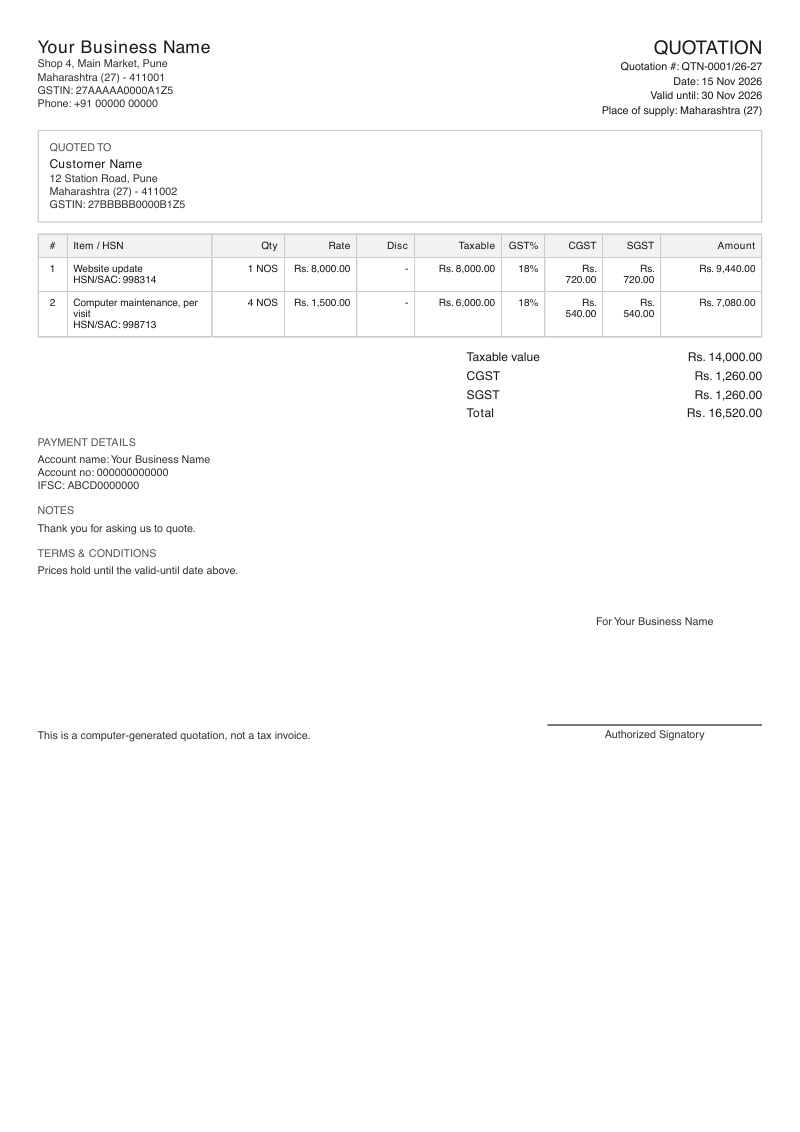
A filled-in example for a service, printed by Gallafy's own quotation PDF, so you can see where everything goes.
Download PDF sample
The sample's services, SAC codes and GST rate are an example. Check the rate for what you sell.
What it looks like
Quotation first, invoice when you sell
A quotation is an offer, not a tax invoice: the tax invoice comes when you sell.
For that, there is a free format too: GST invoice format in Word, Excel and PDF
Rather not retype a quotation as an invoice?
Gallafy makes the quotation for you, works out the GST, and turns it into an invoice without retyping when your customer says yes.
30 days free, no card.