

Free download
GST invoice format in Word, Excel and PDF
Blank tax invoices in Word and Excel, laid out the way Gallafy prints one: the same labels in the same places. Fill one in and print it; the PDF is a filled-in sample. No sign-up, no email.
Pick a format
Word .docx, about 7 KB
A blank A4 invoice to type into and print, with a box to tick for each copy. For a sale inside your state: CGST and SGST.
Download Word formatExcel .xlsx, about 35 KB
Two sheets: a sale inside your state (CGST + SGST) and a sale to another state (IGST). Each line has a discount column, in rupees. Type the quantity, rate, any discount and the GST rate (18 for 18%); formulas work out the taxable value after the discount, the tax and the totals.
Download Excel formatPDF sample .pdf, about 15 KB
A filled-in example for a service, printed by Gallafy's own invoice PDF in the two copies rule 48 asks for, so you can see where everything goes.
Download PDF sample
The sample's services, SAC codes and GST rate are an example. Check the rate for what you sell.
What it looks like
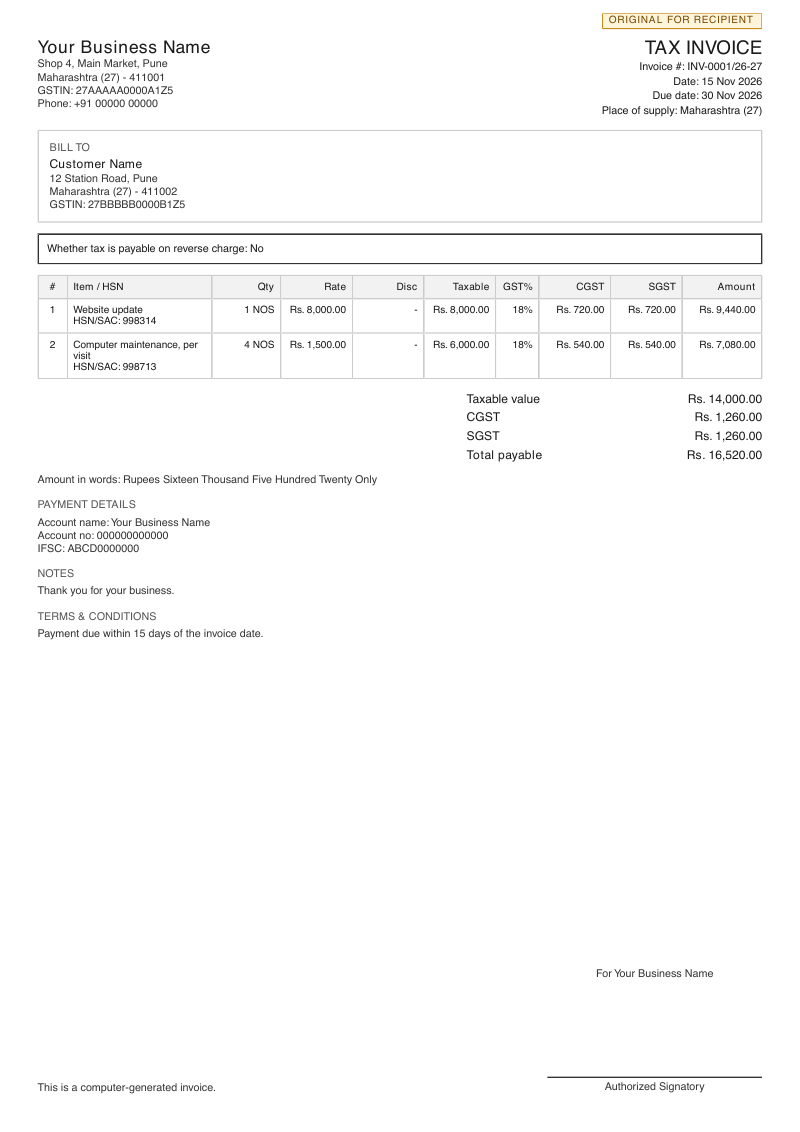
What the format has room for
Each line names the clause of rule 46 of the CGST Rules, 2017 that asks a tax invoice to carry it.
- (a)Your name, address and GSTIN
- (b)An invoice number of up to 16 characters
- (c)The date
- (d)Your customer's name, address and GSTIN, if registered
- (e)For a customer without a GSTIN, when the taxable value is ₹50,000 or more: their name and address, and the state's name and code
- (f)Below ₹50,000, the same details if your customer asks for them
- (g), (h)Each item's HSN or SAC code and description
- (i)The quantity
- (j)The total value
- (k)The taxable value after any discount
- (l)The GST rate
- (m)The CGST and SGST, or the IGST
- (n)The place of supply
- (p)Whether tax is payable on reverse charge: yes or no
- (q)A signature
Some sales need more: the address of delivery, which rule 46 asks for with (e) and (f) and when it differs from the place of supply (o), or an e-invoice's QR code (r) once your turnover requires e-invoicing. The format has no line for a delivery address: add one when your sale needs it. A template cannot number your invoices in order for you, or make an e-invoice. Your CA can tell you which apply to you.
Copies
Under rule 48, goods go out in three copies, marked Original for recipient, Duplicate for transporter and Triplicate for supplier; services in two, Original for recipient and Duplicate for supplier. The Word and Excel formats let you tick which copy each print is. An e-invoice needs no copy marking (rule 48(6)).
Rather not fill in a form for every sale?
Gallafy makes this invoice for you. It works out the GST, numbers every invoice for you, opens WhatsApp with a link your customer can open, and keeps track of who owes you.
30 days free, no card.